Showing posts with label technology. Show all posts

Monday, January 2, 2012

Technological Change in Higher Education

computer chip technology

Advances in the External Environment

In 1965, Intel co-founder Gordon Moore forecasted the exponential growth of computer processing power by observing that transistor density on integrated circuits doubles about every two years (Intel Corporation, 2005). In the time it takes a comprehensive literature review of technology in higher education to be published, new innovations are likely to emerge. Since the arrival of the Information Age, technology has been synonymous with computing power, electronic devices, and digital information. Historically, however, technological advances in the form of stone points predate modern humans.

By definition, information technology has existed throughout recorded history. Ever since information was captured and transmitted through clay, stone, papyri, paper, and digital medium, modern technology has progressed to make the information readily available and easily accessible. Some view the increase in technology as a disruptive change that will revolutionize education, while others view academic institutions as slower to respond to the methodical creep of the Digital Age.

Because technological change involves major shifts in the way information is gathered, stored, and transmitted, implications for higher education are both urgent and unclear. Barry Mills speaks to the immediacy of the external environment’s encroachment on the doorstep of his institution: “I am convinced that we cannot responsibly ignore the changing dynamics in the way that information is stored and delivered, because these changing dynamics will undoubtedly change our role as educators” (2011). The scope of this paper is to identify how the already documented advances in technology affect colleges, how those institutions respond to the affect, and how changes in the technological features of higher education are managed.

Innovation, Adaptation, and Diffusion

Individuals within organizations bring ideas from the outside into their work routines (or create their own new ideas from within), those ideas change their routines, and the good ideas are transmitted to others in the institution. These affects alone are not changes to the organizational level, but a response to the presence and impact of technology. Themes of innovation, adaptation, and diffusion are strategies often described in relation to technological change (Kezar, 2001; Renes & Strange, 2011). Innovation can be defined as a product, process or procedure within an organization that is new, intentional, not routine, aimed at producing benefits, and having public effects (Kezar, 2001, p. 14). Innovations in the technology of higher education can either be introduced from the external environment or created within the organization. These new, intentional changes might take the form of tangible products (e.g. computers, hard drives, projectors, smartphones), processes (e.g. electronic assessment), or procedures (e.g. electronic course registration). Adaptation refers to modifications and alterations in response to changes in an external environment (Kezar, 2001). Adaptation narrowly describes the types of changes that occur within an evolutionary change model, which is discussed in the next section. Finally, diffusion models are an important consideration for how individuals adapt to innovations, though they do not adequately describe organizational change.

Kezar (2001) describes diffusion as a series of phases that individuals traverse, moving from awareness to interest, evaluation, trial, and finally adoption. Renes and Strange (2011) reviewed studies on motivations to use technology in teaching and found that individuals at different levels are more or less likely to embrace innovative change. Drawing on the work of Rogers (1995) and Hagner and Schneebeck (2001), they identified a variety of labels used to described how members of a social system adopt innovations. Rogers identified “innovators” and “early adopters” as those who begin using new technology within a system, followed by “early majority” and “late majority” adopters who are subsequently introduced to the innovation and may require evidence to encourage their adoption (as cited in Renes & Strange, 2011). Furthermore, in a study of 240 faculty members, Hagner and Schneebeck (2001) identified four groups based on individual motivation to adopt new technologies: Entrepreneurs, risk adversives, reward seekers, and reluctants (as cited in Renes & Strange, 2011). The largest group, risk adversives, is characterized by a lack of technical expertise, a fear of new teaching environments, and a hesitation to engage in self-examination.

The diffusion process as a description of the way individuals adapt to innovation does not accurately represent how change occurs at the organizational level. However, it is important to understand the characteristics of individual members because their aggregate experience with the diffusion of technology has an impact on the overall change process.

Theoretical Model of Technological Change in Higher Education

“Writing about [information technology] is like taking a snapshot of a marathon that has no clear rules, no clear route, and new competitors being added at odd times” (Barratt, 2003). This simile helps to describe technological change in “third period” terms, viewing change as a process rather than an episode, and without clear beginning or end (Demers, 2007, p. 115). The process view of organizational change is also reinforced anecdotally by the president of Bowdoin College, Barry Mills, who writes: “Technology… will have the power, potentially, to incrementally, rather than disruptively, improve our educational model” (2011).

Specifically, the theoretical model of change that most adequately describes the process of adaptation to technological change in higher education is the behavioral learning approach, which is grounded in the natural evolution perspective. Unlike the population ecology framework, organizational evolution acknowledges that organizations are capable of responding to changes either internally or externally, and that they are not simply outlived by fitter organizational models (Demers, 2007). Organizations learn by adapting routines, which is an experimental (i.e. trial and error) process emphasizing perceived stability and change (Demers, 2007, p. 123). These changes occur as a result of a continuous process in which organizations develop relatively fixed rules that are designed to incorporate feedback into their evolving relationship with the environment.

Although individuals working in an organization have individual thoughts and emotions, at the systemic level, the organization is capable of “learning” and adapting as a whole. When learning “occurs simultaneously at various collective levels” within an organization, it is capable of learning and adapting in spite of individual differences in its constituent parts (Burke, 2011, p. 79). Learning organizations also demonstrate a capacity to change while promoting systemic thinking, and involve “widespread participation of employees… in decision making, dialogue, and information sharing” (Burke, 2011, p. 79). Organizations engaging in behavioral learning account for the flexibility and lack of restrictive direction necessary to adapt to turbulent and fast-paced technological changes entering from the external environment.

Facilitating Technological Change

Studies examining factors that influence the implementation of technology within higher education incorporate “third period” perspectives that utilize informal bottom-up and individualized behavioral learning approaches. Nicolle and Lou (2008) found “peer support along with institutional support and perceived improvement in student learning were key influences” (As cited in Renes & Strange, 2011, p. 207). Furthermore, the same study found that discussing technological innovations during informal lunch meetings was more productive than formal training by technology staff members. Nicolle and Lou (2008) concluded, “when faculty members can see a clear personal benefit for themselves and see an increase in learning potential for their students, they are more likely to begin using technology” (As cited in Renes & Strange, 2011, p. 207). These findings connect with several principles for change strategies identified by Kezar (2001). By articulating and maintaining core characteristics (emphasis on student learning), and connecting the change process to individual identity (clear personal benefit for faculty), successful adoption of innovative technologies can occur.

At the annual conference of the Professional and Organizational Development (POD) Network, an interactive workshop produced a list of “roadblocks, obstacles, and speed bumps” that stand in the way of technological change (Bruff, Harapnuik, & Julius, 2011). The list includes faculty mistrust of technology, faculty needing examples for effective use of technology, and lack of cultural openness to try new technology (Bruff et al., 2011). In this list, faculty acting as the “late majority” and risk adversives reiterate the role of the individual in adapting to technological change. Kezar’s change principle for creating a culture of risk and changing belief systems (p. 121) aligns with a key feature of the “third period” behavioral learning approach: Search rules.

The behavioral learning approach utilizes routine-based change, and search rules can be thought of as routines for minor problem solving. That is, the routines influence the range of innovative alternatives that are available for choice (Demers, 2007, p. 124). There is a tendency for agents to refine existing technology rather than explore new technology, thereby playing it safe and reducing the risk of choice. To counter this conservative tendency, Kezar’s principle for creating a culture of risk will allow the adoption and invention of new routines.

Leading by Thermostat: Unfreezing, Changing, and Refreezing

The nature of technological change in higher education does not allow for accurate long-term planning. Therefore, organizational leadership could seek to manage the change process by regulating the thermostat. Using Lewin’s three step model of freezing, changing, and refreezing, Burke describes the actions that could facilitate change along these overlapping stages (2011).

Unfreezing – To successfully unfreeze an organization’s technological patterns, structures, and processes, a leader can promote change by increasing awareness of external developments. By drawing attention to the latest websites, services, gadgets, programs, and upgrades, a leader can help members at the individual level begin to experiment with new routines. Edgar Schein (1987) elaborated on Lewin’s stages, and described the creation of psychological safety as it pertains to the unfreezing process. He said that individuals need “to have no fear of retribution or punishment for embracing the change” (As cited in Burke, 2011, p. 166). Creation of psychological safety to engage in change is similar to Kezar’s principle for creating a culture of risk that was previously mentioned. Mark Milliron, president of the consulting group Catalyze Learning International, commented on technological change in higher education at a technology forum: “The worst thing in the world you can do is have a leadership team come down and say, ‘Damn it, innovate.’ I think you catalyze conversations and get people moving” (Arbogast, 2008). Milliron speaks to an essential component of change embodied by “third period” thinking; innovation has to happen at every level, and cannot merely be handed down by bold leaders.

Milliron continues:
I think people have figured out that the trickle-down theory of technology does not work. They have invested a ton of money in the innovators and have expected that the innovators will go do rowdy, great things, and then that would trickle down into goodness for the rest of the institution. And what they ended up with is a lot of segregation (Arbogast, 2008).
Changing – While Schein described changing as a cognitive restructuring, the change process of behavioral learning can be thought of as a systematic change in routine resulting from the integration of relatively fixed rules for continuously modifying the organization’s relationship with the external environment. So, while the change process is sufficiently described above, Schein’s description of Lewin’s change process can still provide useful guidelines for leaders. After unfreezing, the two processes necessary to promote change are the identification with a new vision, and scanning the environment for new relevant information (Burke, 2011). The leader could provide a new vision for adopting a certain process or piece of hardware. Additionally, the leader could align with a new routine or process and foster the diffusion of that idea to other individuals within the organization. If learning occurs at various simultaneous levels, then the organization itself can fundamentally change. Next, scanning the environment for new information would take the form of a search rule in the behavioral learning model. As in the case where faculty were more likely to adopt new technologies when they were introduced informally during lunch rather than at a training session hosted by IT staff, individuals engaging in a search for new routines will naturally go through a process of trial and error without being coaxed into a particular routine. This trial and error happens at the leadership level as well. Referring to online education, Richard Garrett, program director for the consulting group Eduventures, acknowledges that “everyone is experimenting; there is a lot of hype, a lot of possibility,” and concludes that the hype moves faster than the application of new technology, which, he says, does not have much velocity (Arbogast, 2008).

Refreezing – The integration of change consists of two parts, as identified by Schein (1987): “Helping the organizational member feel comfortable with the new behavior,” and “making sure that the new behavior fits well with others” (As cited in Burke, 2011, p. 167). These guidelines place a lot of emphasis on sustaining the change through reinforcing the new routines established at the individual level. The leader, in this case, can provide positive reinforcement to encourage the use of desired routines, and could relate new processes to core characteristics and personal identity to increase the chances of successful adoption of the new traits (Renes & Strange, 2011).

Conclusion

Technological change in higher education may seem both turbulent and incremental, depending on the frame of reference. At any given moment, the sheer pace of technological advances can seem quite chaotic and revolutionary. However, on a longer timeline, technological improvements are modeled as an exponential curve, and rarely make leaps (at least in terms of processing power) beyond what should be anticipated. On the other hand, although technological growth is steadily progressing, its characteristics are still largely unpredictable. As mentioned above, describing advances in technology is like taking a snapshot of a marathon with no clear course and no clear rules. In other words, while the pace is knowable, the direction, key players, and eventual outcomes are mysterious. Because of this nature, technological change in higher education can be viewed as grounded in the natural evolution perspective. Long-term forecasting is less beneficial, and institutions of higher education favor the flexibility to respond to the latest trends. However, these responses must be grounded at the individual level in order for the organization to “learn” and adapt to external changes. Because of this, the behavioral learning model is a helpful insight into the ways colleges change regarding technology.


[Photo courtesy of johnmuk. Licensed under CC BY-NC-SA 2.0.]

References

Arbogast, W., DeMillo, R. A., Garrett, R, & Milliron, M. D. (2008). IT on campuses: What the future holds. The Chronicle of Higher Education, 54(30) B6. Retrieved from http://chronicle.com/article/IT-on-the-Campuses-What-the/31631

Barratt, W. (2003). Information technology in student affairs. In Komives, S. R. & Woodard, D. B., Jr. (Eds.), Student Services: A Handbook for the Profession (4th ed.) (379-396). San Francisco, CA: Jossey-Bass.

Bruff, D., Harapnuik, D, & Julius, J. (2011). Revolution or evolution? Social technologies and change in higher education. The Chronicle of Higher Education. Retrieved from http://chronicle.com/blogs/profhacker/revolution-or-evolution-social-technologies-and-change-in-higher-education/29304

Burke, W. W. (2011). Organization Change: Theory and Practice (Foundations for Organizational Science series) (3rd ed.). Thousand Oaks, CA: Sage Publications.

Demers, C. (2007). Organizational Change Theories: A Synthesis. Thousand Oaks, CA: Sage Publications.

Intel Corporation. (2005). Moore’s Law. Retrieved from ftp://download.intel.com/museum/Moores_Law/Printed_Materials/Moores_Law_2pg.pdf

Kezar, A. J. (2001). Understanding and Facilitating Organizational Change in Higher Education in the 21st Century. In ASHE-ERIC Higher Education Report: Vol. 28(4). San Francisco, CA: Jossey-Bass.

Mills, B. (2011). The challenge of technology. Inside Higher Ed. Retrieved from http://www.insidehighered.com/views/2011/09/19/president_of_liberal_arts_college_considers_the_way_technology_should_and_should_not_change_academe

Renes, S. L., & Strange, A. T. (2011). Using technology to enhance higher education. Innovative Higher Education (36) 203-213.

Tuesday, October 11, 2011

Facebook Timeline and easy OSX screenshots

I can really kill two birds with this post! I just wanted to share a couple neat tricks I came across during Fall Break. The second will be used to highlight the first, and that is Facebook Timeline:

I've heard Facebook Timeline referred to "the journal I didn't realize I was keeping," which I tend to agree with. Facebook Timeline will be going live on October 16, 2011, but it is already up and running for Facebook developers. If you want to enable it now, basically you have to be a developer.

To be a developer, all you have to do is create a Facebook application - even if it doesn't work or do anything at all. Instructions to become a developer (of nothing) can be found via Mashable. It took me about 2 minutes to enable, and now I can make sure I have my timeline sufficiently edited before the big release date.


I noticed that a bunch of unflattering photos of myself came rearing their ugly head in the timeline, which appears to give more 'news feed' preference to albums rather than just status updates. Although I had a lot of the unpleasant photos untagged, I still appeared in previews of the entire album that popped up regardless of whether or not I was tagged in them.

Although these photos were never removed from Facebook, I always felt safer by not being tagged. Now that the albums themselves are given more prominence, it's worth taking a walk down memory lane to make sure your public image is intact.


Hiding items from your timeline is easy using the 'Edit or Remove' drop down menu, or you can choose to highlight items by clicking the star, which makes the post wider to cover both columns.


Isn't this fun? I'm using neat trick #2 to talk about neat trick #1. That is to say, I'm utilizing several OSX screenshot capabilities to take quick captures of my Facebook page.

I always wondered how people would take images of their comments on Tumblr and then publicly comment on those comments - it seemed like a lot of work. Now I realize they must have been saving a screen shot of an arbitrary area as a file by holding Command+Shift+4 on their Mac. Check out more options on this Hack College post.

Friday, September 16, 2011

QR codes on development mailers vs. txt to DONATE numbers

example of QR code on mailer

QR codes are definitely becoming more commonplace, but I'm pretty sure this is the first one I've received on a letter asking for money. QR codes on a development mailer are a fine idea, but it doesn't really save me any time. If I'm too "busy" to write a check and put it in the pre-addressed envelope, then I'm probably too busy to type all my billing information and credit card number into tiny fields on my phone.

If you REALLY want to save time, let's go back to 2007 and use the "text DONATE to 55555 to give $10 immediately" method. I love the "txt DONATE" numbers, and I am more likely to send a SMS while I'm microwaving my instant coffee than I am to hunch over my tiny iPhone screen and type out my credit card number.

Of course I really have no experience in this area, but I'm thinking the volume of super easy $10 donations would match the number of people writing out a check for larger individual contributions. Plus, if you're assuming your donors know how to use a QR scanner, you can safely assume they know how to text.

Maybe you could flash the number on the scoreboard at football games. "Help your team! Text DONATE to 55555 to give $10 to the Athletic Department Development Fund."

Maybe you could put it on a banner in the Rec Center. "Want new equipment? Text DONATE to 55555 to give $10 to the Rec Renovations Fund."

QR codes shouldn't replace these "txt DONATE" options just because they're newer.

Sidenote: What happened to Blackbird Pie? I'm using EmbedTweet now and I don't like it as much! It uses a javascript that turns any link to a tweet into that tweet.

Embed this tweet

Thursday, September 8, 2011

Posting from the new Blogger iPhone app

Let's see how this goes! I'm posting from the brand new (and long awaited) Blogger iPhone app!

Now I have mobile access to post relevant and groundbreaking material at all times: Check out this picture of my cat!

I have no idea how the photo will look when it posts because it merely appears as an attachment - that's one inconvenience so far. And since I'm someone who is rather anal about having a standard image width (475px) for consistency, uploading without control over the placement is making me cringe.

Overall a very functional app, but if I'm going to post photos, I'll still need a "real" computer to satisfy my need for standard image width and image alt tags.

Sunday, August 21, 2011

How the one-week free printing "holiday" could backfire, and more free textbook doomsday predictions


You know how banks and big corporations hire hackers to help create network security systems by exploiting loopholes and then reporting on the problems? Well, consider this proof-of-concept post a warning. After all, if I'm able to figure this out at the ripe old age of 27, you bet the first-year students are already well aware of this trick.

Consider: The Technology Support Center announced a free printing "holiday" in campus computer labs. An email to the entire student-body included the following:

Information Technology Services (ITS) is pleased to announce that there will be a printing "holiday" for students on the main and Firelands campus from 6 a.m. Monday, August 22 through 11:59 p.m. on Saturday, August 27. During this time period students may print in any open lab without incurring a charge. The process to print will remain the same, however when the charge to print appears it will be calculated as zero.

The normal cost-per-page printing system is a result of the university's Print Responsibly program. "With Print Responsibly in place BGSU no longer owns any non-specialized printers, copiers, fax machines or scanners, and is no longer responsible for purchasing/replacing toner, or other materials or maintenance costs. A per page price is paid for printing/copying/faxing services" (source).

While Print Responsibly increases computer lab sustainability for the university, it normally puts some of the burden of printing costs on the students. However, during what I'm now referring to as Printapalooza, students will have unlimited free printing capabilities for an entire week! Since printing operations (and costs) are no longer handled by the university, I don't think the university will be footing the bill for the forthcoming printing free-for-all.

I asked ITS for clarification about whether there will be a page limit, and they replied via email: "This is unlimited printing for all students for the week. We hope that students will use it justly."

How will this be abused? I'm glad you asked...

Book scanning services have been cropping up due to an increased demand for digital print. Traditionally, book scanning services have been rather expensive. Recently, Hack College posted about a new service that scans 100 book pages for 1 dollar. This means you could convert your textbook into a printable PDF for a couple bucks - and then take advantage of the free printing "holiday" to print copies for you and your classmates.

What's the catch? Well, the cheapest scan option from 1DollarScan is what's called "destructive scanning" and means the binding will be cut to increase the scanning speed. So this means students will not be scanning their textbooks and returning them to the bookstore. However, there's nothing stopping them (other than copyright laws) from pooling their money for one book that can be turned into an unlimited number of digital copies, or printed for free during Printapalooza.

Free printing and textbooks in PDF form sound like a risky combination to me, and it's concerning that no printing limits have been set. Is the free printing "holiday" going to backfire? I guess we'll find out on Monday.

Continue reading for more doomsday predictions...

If book scanning services are only $6 for 600 page textbooks, what is going to stop students from uploading PDF textbooks to bootleg websites, making expensive books available for free. Could this be the tip of the iceberg that sinks the textbook industry? I think there are a lot of parallels between hypothetical digital textbook download websites, and the rise of bootleg mp3 music files that proliferated when I was an undergrad in the early 2000's.

Could it happen? One survey suggests that it's already happening. The Book Industry Study Group (BISG) published the results of a study titled Student Attitudes Toward Content in Higher Education. The study found that "More than 40% of survey respondents said they bought a textbook from a pirate website, or know others who have. In addition, many respondents reported copying their friends' textbooks" (source).

The BISG also found that photocopying course materials and illegal downloading of course content is on the rise among college students. In fact, they report that illegal photocopying of content doubled (from 20% to 40%) since Fall 2010.

When you put a tool like free printing in the hands of students who are more and more likely to illegally photocopy or download textbooks, along with no limitations other than hoping students will "use it justly," I think the temptation to illegally print entire books for free is just too great.

Saturday, August 20, 2011

Intel's "Museum of Me" is a fun way to render your recent Facebook activity

museum of me

I found this on open thinking, and thought I would give it a try. It's called the Museum of Me, and all you have to do is link the application to your Facebook info so it can pull recent and relevant data to put into your museum (and what a trendy looking museum it is!)

museum of me

Not all of the images were museum-quality, but I guess that's my own fault, right? It seems to pull from more recent data, because everything I saw in my museum was from this year, and I have a lot more content online than what was shown. They even gave me little virtual tourists!

museum of me

So give it a try, it's an enjoyable 3 minute tour set to music and it doesn't spam you with FarmVille requests!

Monday, August 15, 2011

Twitter list of job postings in higher education

twitter list of higher education jobs

There are several good Twitter accounts to follow for frequent job postings, but why not follow them all at once?

The Bowling Green Student Development Association (@BGSDAonline) has compiled a list of the best higher education and student affairs job posting Twitter accounts.

Another great resource is the student affairs job announcement / job search hashtag #SAjobs. So what are you waiting for? Go get that job!

Sunday, August 14, 2011

Embed Instagram feed into Blogger, finally!

embed instagram into blogger blog with badgeplz to get instagram for blogger

I've been looking far and wide for a way to use Instagram for Blogger, or a gadget that would embed my Instagram feed into my blogspot blog. I was super jealous when Google searches only turned up Wordpress plugins! Finally, I found a site called BadgePlz which offers a variety of tools for embedding photostreams.

Visit the BadgePlz Instagram tool to get started.

It's very easy to use, and embeds the final product as an iframe. You have complete control over the number of columns and rows, as well as the background color. The thumbnail size appears to be fixed, but you will probably figure out a format that fits your Blogger blog!

In Blogger, simply click "Add A Gadget" then select new "HTML/Javascript" then copy and paste the iframe code given to you by BadgePlz.


I've been looking for something to put in the footer of my blog, and my Instagram feed is a fun compliment to my "About Me" section! Enjoy!

Does authenticity require snarkiness?

eric stoller and jeff lail

The title of this post comes from an #SAlive question during the episode from April 21, 2011 on Professionalism and Social Media. I found the episode extremely relevant, because I am still working out the tone of my new blog and have dramatically increased the frequency of my tweets during the past month or so.

There are a lot of personal opinions on the topic of professionalism and social media. I won't attempt to summarize the entire issue (@EricStoller and @jefflail host a fabulous discussion of the topic in this hour long video).

Back to the title, does authenticity require snarkiness? In the video, Jeff advised that "If that's who you are, just be who you are." Overall, I really enjoyed this video, probably because it confirmed my current beliefs (and who doesn't like being validated?). I try to use my Twitter account, blog, and Facebook profile in a culturally competent way. As long as I utilize my culturally competent lens while using social media, there shouldn't be any problems. Now this does leave a little room for mistakes, or things taken out of context. But overall, I think of myself as a good person, so my authentic tweets should have no problem portraying that.

So if you're in the mood for a little snarkiness, have at it! Use the lens of a student affairs practitioner to inform your content, and there shouldn't be any problems.

Of all professions, I think people who work in student affairs would naturally produce less offensive, more inclusive content without ANY list of Twitter Do's and Dont's - so what are we so worried about?

Thursday, August 11, 2011

Drinking culture Prezi presentation for RA Diversity Day adds some unexpected wellness

Drinking culture and the beliefs your students bring to campus

On Wednesday, I presented a Prezi titled Drinking Culture and the Beliefs Your Students Bring to Campus to a group of RA's for RA Diversity Day. I know, normally we don't get to sneak alcohol education into diversity training - but this went over rather well! The entire thing took an hour and 15 minutes. I took the lead, and was followed with sections presented by our Drug and Alcohol Prevention Specialist at the Counseling Center, and our Director of Wellness.

I started with a hook: Some interesting alcohol facts about traditional beverages from Egypt and Kenya. I got my information from the 2004 WHO report on alcohol, which is quite a hefty document!

I talked about different minimum drinking ages in different countries, which led into a discussion of countries where alcohol is forbidden (for citizens) with a reference to Sharia customs. I think this religious component was really interesting, and mirrored it later by talking about the Mormon "Word of Wisdom" which also explicitly prohibits alcohol.

The quilt activity in the middle was probably the RAs' favorite part. We had them each draw pictures or words that represent the direct and indirect influences of their own family or community. We had some pretty creative quilt squares! The students really enjoyed sharing with each other, which drove home the point that everyone brings different experiences and influences with them to campus.

Drinking culture and the beliefs your students bring to campus

It took me forever to find vector world maps to use on Prezi. Then I found out Prezi supplies a vector world map template presentation that was way better than the maps I found, and I felt silly. So make life easy, and just re-use the Vector Maps in Prezi template.

What I learned: Don't reinvent the wheel, especially when the wheel is a vector map.

Tuesday, August 9, 2011

Written permission from Xbox to let students play games at campus event

I'm writing this post to hopefully help future student affairs graduate assistants and professionals avoid the run-around while planning a campus event that includes allowing students to play Xbox games.

Allow me to summarize this week-long process...

Our department recently purchased an Xbox 360 with Kinect because we planned to have the game set up for our alcohol-alternative Late Night events in the Student Rec Center. The Xbox 360 with Kinect motion sensing camera is a great system that promotes physical activity. It's a lot of fun and a great way to attract students over to an information table!

Because the Kinect requires the players to get up and move in front of the screen, we couldn't use a typical projector because the students would be blocking the image. I heard a rumor that IMS rented rear-projection screens, so we submitted a request.

Denied! They told us we needed written permission from Microsoft in order to play Xbox in public at our event. I knew things like movies required a license to show in public, but I didn't know video games were subject to the same rules.

I called Xbox Support, and the customer service rep told me that there was no reason I couldn't set up an Xbox in our Rec Center for students to play at the event. I asked him if I could get that in writing, and he put me on hold to check with his manager.

20 minutes later, the answer was "No." In fact, the answer had changed from it being "no problem" to play the console in public, to being a violation of the terms of service - which specify that the console is for personal use only.

I checked with our Office of Campus Activities, because I knew they had set up video games for students to play at previous events. They told me that video game rights are essentially the same as movie screening rights. In the same way that you can't publicly screen a movie without purchasing the viewing rights, you couldn't publicly use a video game either. The problem is that unlike the film industry that issues temporary licenses for public showings, there is no temporary-license-equivalent in the video game world. In the past, student organizations had gotten away with it by playing out-of-print games, which removes the event from the legal challenge of infringing on market share.

Oh heck! So what can I do? I called Xbox Support a second time, and explained my predicament. They directed me to email promos@xbox.com and see what they could do. I blindly sent a "To whom it may concern" email and waited... Nothing.

Four days later, I sent another e-mail to promos@xbox.com. This time, I got an auto-reply that directed me to the website sponsormexbox.com. The site is a sponsorship request form were you can formally request that Xbox station a booth at your event or provide funding. Well that's not really what I needed. I just needed permission to play the console we already have - but I could tell I was getting warmer!

written permission from xbox event license process

I submitted a request, filled out all the info, and ended my event description with "We already have an Xbox, we just want permission to play it."

written permission from xbox event license process

Two days later, I received an email from Wunderman3, the agency responsible for Xbox sponsorships. I was told: "Since this is something informal, we don’t require you to receive any permissions to have Xbox at your event." Good enough for me! [PRINT]

VICTORY!!

Written permission from Xbox to let students play games at college campus event

What I learned: Campus-wide events for 2000+ students are considered "informal," which makes my life easier!


@EricTeske That was extremely helpful, Eric. Nice job! Thanks for putting it out there.less than a minute ago via web Favorite Retweet Reply


nicely done. Too many ignore obtaining rights RT @ericteske: permission from Xbox to play games at campus event http://t.co/6SoZGkP #sachatless than a minute ago via HootSuite Favorite Retweet Reply


@mikesevery @ericteske Agreed - I've never heard another schools obtain rights to use xbox. They just use it.less than a minute ago via HootSuite Favorite Retweet Reply

Monday, August 8, 2011

Embed tweets in your Blogger post without taking a screenshot

I love learning new things, especially when they make my life easier! This one is a no-brainer: How can I embed a screenshot of a tweet without taking a screenshot, cropping it down, and uploading the image? Simple, bake yourself a Blackbird Pie.

Blackbird Pie has been called "a prototype" "really rough" and it's author boasts that it "doesn’t even work in a lot of places!" But can it live up to the hype?

In a word: Yes. It works on Blogger, and promises to save me dozens of minutes of needless Photoshopping down the road. It really is easy as pie (har har har).

Here's an example:


The text stays text, and the script grabs a piece of background image for context! It even sizes itself to my post, what's not to love??

What I learned: If it makes life easier, somebody's already on top of it.

10,000 hours to produce an expert virtuoso gamer

TED talk jane mcgonigal gamer image

The average young person in a videogame rich culture will spend 10,000 hours gaming by age 21. In her February, 2010 TED talk, Jane McGonigal uses the term "virtuoso gamers" to describe these players amassing as many hours gaming as international athletes spend practicing, and professional musicians have spent learning their art.


McGonigal is right on the money with this one, gamers are gaining useful skills and becoming virtuosos in their own right. She identifies four skills that gamers develop during their 10,000 hours of play, including (1) urgent optimism, (2) weaving a tight social fabric, (3) blissful productivity, (4) and attaching epic meaning to what they do.

While I agree that virtuoso gamers exhibit these traits, they seems a little too philosophical and probably describe the culture more than the skills themselves. What are gamers really "getting good at"? I'd argue that they are learning decision-making skills, strategy, and of course the physical fine motor skills of playing the games themselves.

These gamers will have the controller sensitivity set on high, and swing their Call of Duty gun around with expert precision, or launch a Halo 'sticky' grenade at precisely the right moment. From the perspective of sport psychology and motor skill develop, these concrete skills should not be overlooked.

These gamers will instantly be candidates for operating remove drone aircraft, driving robots to retrieve bombs, or even seek careers as air traffic controllers.

What I learned: Gamers are a different kind of athlete.

Sunday, August 7, 2011

Google Sites increases sustainability of student organization websites

When I was handed the position of Webmaster for our Student Development Organization, I had to request access to the university's FTP server with my Blackboard user ID. After a day or so, an administrator finally granted me permission to our student organization's designated webspace. To modify our current site, I would have to download an HTML editor and an FTP client. Furthermore, our URL would always be long and unappealing (http://www.bgsu.edu/studentlife/organizations/bla/bla/bla).

In the late 1990's, free webspace on the university's servers might have been an appealing offer, but unfortunately even the latest upgrades to their content management system have not kept up with the user-friendly features of Google Sites.

An important feature of any student organization website is sustainability. By this, I don't mean how "green" the page is, but how easy it is to hand down to the next cohort of students. Rather than submitting a request to IT to have them grant administrative access to a select portion of their FTP server, we have a simple login to our Google account that hosts online documents, a calendar, email, and website - all for free!

When it comes to the design itself, Google Sites offers amazing features that allow you to easily embed Google documents, forms, and calendars directly on the pages. Webmasters need only know how to operate a word processor, because all of the tables, columns, and wrappers are adjustable with a slide bar - no coding required.

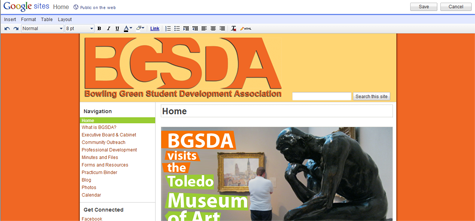
Google Sites increases sustainability of student organization websites

Because of its ease of use, Google Sites increases the chances that a student in the next cohort has the know-how to keep the site going.

Google Sites increases sustainability of student organization websites

It seems that student organization webpages go through generations, as capable webmasters come and go. I was able to find 3 past generations of my own student org's page, each created and maintained by a different student. Undoubtedly, each student created a page as they saw fit, using the tools they were familiar with. When they left, the site left with them. Hopefully Google Sites can break the cycle, because there are no original files located on a personal hard drive, the interface is simple and inviting, and Google provides adequate support for common problems and questions.


I suppose only time will tell if my own Google Site lasts more than one 'generation' of transitions, but I have high hopes. And I'm not surprised to see more and more student organizations, programs, and offices creating their own sites on Google.

What I learned: Don't re-invent the wheel, just Google it. 

Foursquare relaunches university campaign including free custom badge program

Foursquare relaunches university campaign

I just found out about foursquare's expanding features for colleges and universities. On July 25, the foursquare blog made three major announcements about their Universities 2.0 campaign:
  1. The launch of their new (FREE) custom badge program for university partners who want to deeply incorporate and promote the use of foursquare on campus.
  2. An invitation for college foursquare account holders to get in touch with the company through a Google form.
  3. The relaunch of a university ambassador program for enthusiastic students (like me!). 
Students can sign up for the ambassador program through a Google form, similar to the contact form used for school account representatives. 

Aside from the custom college badges, foursquare has been offering a set of campus-specific badges since last year, including a Bookworm Bender badge for checking in to an academic building after midnight, and a Munchies badge for checking in to 5 different dining halls.

I don't know who is supposed to be on top of this at BGSU, but somebody already owns a university foursquare account. It looks like I can hope to become an ambassador, maybe get a free t-shirt, and continue to be a foursquare fan. I wish I knew who owned the BGSU account so I could tell them to take advantage of this opportunity to foursquare-ify the campus for real!

The fact that I won't have administrative rule over a university foursquare account doesn't mean I can't fantasize about what the custom badge might look like. Here are some unauthorized samples I came up with:


Hey, even if these don't turn out to be what the eventual foursquare badge looks like, these would make some killer BGSU guitar picks!

What I learned: Enthusiasm doesn't equal authority.

Friday, July 29, 2011

QR Codes and About.Me, One Thing Leads To Another (Literally)

I was playing around with QR codes for the first time last night, because I just downloaded a free QR Code Reader app for my iPhone. QR codes are two dimensional bits of code that can create hyperlinks printed on physical objects. I figured someone claiming to be techy would have a QR code on their business cards by now, so that led me to my next question. How do you make one?

qrcode A quick Google search solved that problem, as there are a number of QR code generators out there. I used Kaywa for this one. You can also try Qurify for text only messages, or QRstuff.com for more complex codes like contact information or calendar events.

I'm not sure if the general population really knows what to do with these yet, but they are definitely becoming more prevalent. I do have some concerns with accessibility, however, because putting this square barcode on your business card is like saying "you have to own a smartphone with a camera to get to know me."

So great, now I know how to make one - but where should I have my QR code link point to? This blog? Well, out of context it might be a little abrupt (see penis model post). I needed to establish some context first, so I decided to create an about.me landing page that links to all of my virtual identities.


Once I linked my about.me page to LinkedIn, I realized my resume and profile photos were outdated. So, the simple project of making a QR code led to creating an about.me profile, which led to updating my resume.

What I learned: When it comes to QR codes, one thing literally leads to another.

Sunday, July 17, 2011

Class of 2015 Facebook page turned promotional land-grab


Bowling Green State University made a Facebook page for the incoming Class of 2015 that has received a rush of attention. This page has turned into an invaluable forum for conversing with students who are navigating Orientation, networking with each other, or just sharing their excitement.

Looking back, the Class of 2013 page has only 474 Likes, and the subsequent Class of 2014 page saw a jump to 2,806 Likes, but the Class of 2015 page already has 2,942 Likes.

Aside from fostering interactions between future students, the Facebook page has turned into a customer service live chat. Students have been asking how to change majors, or where to buy the summer reading book.

But what's really interesting is watching the various student organizations, club sports, and fraternities and sororities post promotional messages onto the page's wall. It's like a Facebook land-grab for new students who have yet to arrive. I have to admit that I've tried my hand at tapping into this huge population of optimistic students with some mentions of the Student Wellness Network, and advertising a class that only has two students enrolled.


At this point, the population of first-year students hasn't been abused with spam too heavily, and don't seem to mind the occasional solicitation. So I say we all take advantage of this captive audience while we can! If you don't know how to post as your page to another page, read below.

To use Facebook as one of your existing pages, first go to the page that you want to post to and add the page to your page's favorites.


Next, click on the link in the right-hand navigation on your own page. As an example, here is the link to "Use Facebook as BGSU's Student Wellness Network" that I see when I visit my own student group Facebook page.


As long as your page "Likes" the page you're trying to post to, and you are using Facebook as your page, you can post on their wall in the same way you share with friends.

What I Learned: Why wait for new students to get to campus before spamming them?